Solving the elasticity equation
Compute and visualize the displacement of a clamped beam under traction.
A cantilever is held at one end and pulled downward at the other. This example constructs its mesh, assigns boundary labels, solves a vector-valued linear elasticity problem, and exports the displacement for visualization.
The Poisson example introduces the same workflow for a scalar field. Here, the unknown has two components, and different parts of the boundary carry different conditions.
The mathematical problem
The beam occupies the rectangle . Its displacement describes how each point moves from its original position. The boundary is divided into three parts:
- Fixed end: , where .
- Loaded end: , with the uniform traction .
- Free sides: the top and bottom edges, denoted by , with zero traction.
There is no body force. In the small-strain, isotropic model, the strain and stress are
The Lamé parameters are and . These are used directly in a two-dimensional plane-strain model; the geometry and material data are illustrative nondimensional values. The small applied load keeps the displacement small relative to the beam dimensions.
With the outward unit normal, equilibrium requires
The formulation assumes small strains and rotations and a linear elastic constitutive law. See [1] for further background on elasticity and its variational formulation.
The weak formulation
Let . Multiplying equilibrium by a test displacement and integrating by parts gives a weak problem that seeks such that, for every ,
The colon denotes the componentwise inner product of two tensors. The left side is the elastic stiffness; the right side is the work of the applied traction. The free sides contribute no load. Fixing the entire left edge removes rigid-body motions and makes the discrete stiffness positive definite for these material parameters.
1. Construct and label the mesh
UniformGrid takes vertex counts and initially uses unit spacing. A grid with 41 vertices horizontally and 11 vertically, scaled by , therefore covers the required rectangle with 451 vertices and 800 triangles.
  constexpr Real spacing = 0.1;
  constexpr Real length = 4;
  constexpr Real boundaryTolerance = 1e-12; // Coordinate tolerance for this grid.
  constexpr Attribute fixed = 2;
  constexpr Attribute loaded = 3;
  constexpr Attribute free = 4;

  Mesh mesh = Mesh().UniformGrid(Polytope::Type::Triangle, {41, 11});
  mesh.scale(spacing);
  mesh.getConnectivity().compute(1, 2);

  for (auto face = mesh.getFace(); !face.end(); ++face)
  {
    if (!face->isBoundary())
      continue;
    bool onLeft = true;
    bool onRight = true;
    for (auto vertex = face->getVertex(); !vertex.end(); ++vertex)
    {
      const Real x = vertex->getCoordinates().x();
      onLeft = onLeft && std::abs(x) < boundaryTolerance;
      onRight = onRight && std::abs(x - length) < boundaryTolerance;
    }
    mesh.setAttribute({1, face->getIndex()}, onLeft ? fixed : onRight ? loaded : free);
  }
Edge-to-cell connectivity identifies exterior edges. The loop labels an edge as fixed when both endpoints lie on the left end, loaded when both lie on the right end, and free otherwise. The coordinate tolerance is only used to recognize these boundaries on this generated grid. The numerical label values have no physical meaning; the form below gives them their roles.
2. Express the finite element problem
The vector-valued P1 space uses continuous, piecewise affine displacements with two components per vertex, giving 902 degrees of freedom before imposing the boundary values. u is the trial displacement and v is the test function.
  P1 vh(mesh, mesh.getSpaceDimension());
  TrialFunction u(vh);
  TestFunction v(vh);

  constexpr Real lambda = 0.5769;
  constexpr Real mu = 0.3846;
  VectorFunction traction{0, -1e-4};

  Problem elasticity(u, v);
  elasticity = LinearElasticityIntegral(u, v)(lambda, mu) -
    BoundaryIntegral(traction, v).over(loaded) + DirichletBC(u, Zero(2)).on(fixed);
LinearElasticityIntegral includes both stiffness terms in the weak form, including the factor multiplying the strain inner product. BoundaryIntegral(...).over(loaded) restricts the traction to the right end; DirichletBC(...).on(fixed) fixes both displacement components on the left. Zero traction is the natural condition on the free sides, so their boundary integral vanishes.
Rodin expresses the equation as a residual, so the external work is subtracted from the stiffness term. The boundary condition completes the problem.
3. Solve and check convergence
Conjugate gradients is suitable for the constrained symmetric positive definite system. The solver assembles the problem, solves to the requested relative tolerance, and checks success before exporting any result.
  Solver::CG solver(elasticity);
  solver.setTolerance(1e-10).solve();
  if (!solver.success())
    return EXIT_FAILURE;
The computed displacement field is available through u.getSolution(). Solver convergence checks the algebraic solve; a mesh refinement study would be needed to assess discretization error for a chosen quantity of interest.
4. Export and visualize the displacement
XDMF stores the mesh and vector field together. Keep the accompanying HDF5 files alongside Elasticity.xdmf, as they contain the numerical data.
  IO::XDMF xdmf("Elasticity");
  xdmf.grid().setMesh(mesh).add("displacement", u.getSolution());
  xdmf.write().flush();
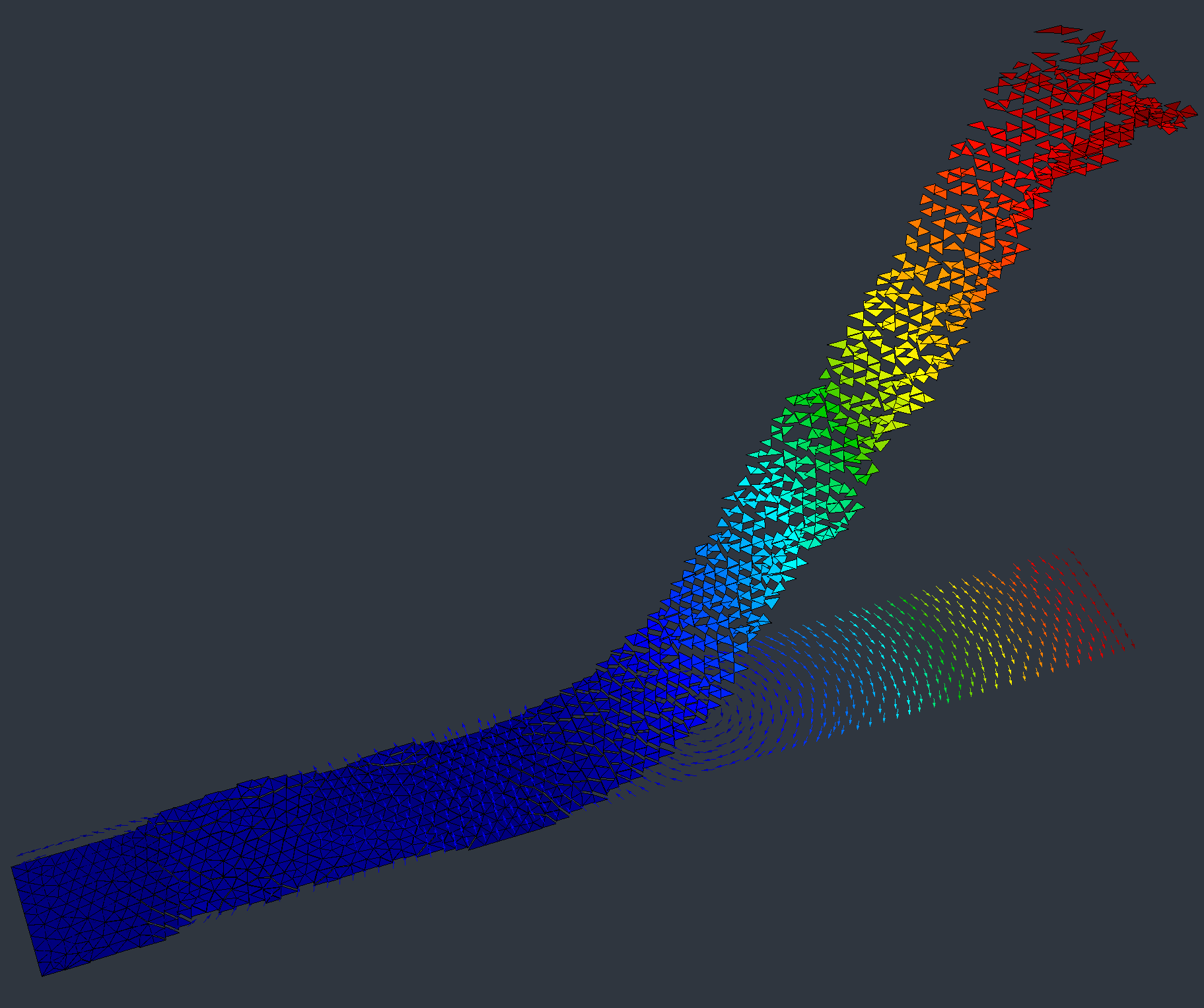
In ParaView:
- Open
Elasticity.xdmfand select Apply. - Apply Warp By Vector, using displacement and a scale factor of 10.
- Color by the Magnitude of displacement.
- Select Surface With Edges to inspect the triangular mesh.
The clamped end remains stationary and the free end bends downward. For this mesh and load, the maximum nodal displacement magnitude is approximately , and the vertical displacement at the loaded end is approximately . The amplification in the figure changes only the displayed displayed geometry; the field and color scale retain the computed displacement values.
Complete program
Build the Elasticity target with the Rodin examples enabled, then run it from the directory in which the output should be written. The program generates its own mesh at startup.
See Elasticity.cpp for the source, the installation guide for build setup, and the I/O guide for further export options.